Showing posts with label iPhone. Show all posts

Saturday, February 28, 2015

#49 Hangouts - Report Feedback on Hangouts App

Hi ya!


First off, this is a change of pace for me, eh?


Now, on to the blog!


Have you used the Hangouts app found in the Chrome Webstore?
See some features that you think Google should add to it? Don’t like some features that you think should be removed? Do you wish you could voice your opinion to Google about your suggestions to improve the Hangouts app?
Well, you can! And this blog post is going to show you how!


What are we waiting for? Let’s get started!


How to send feedback to Google about the Hangouts app


  • Open the app.
  • It should look something like this:
    Screenshot 2015-02-27 at 11.png
  • In the top right corner, you’ll see the gear icon. Click that.
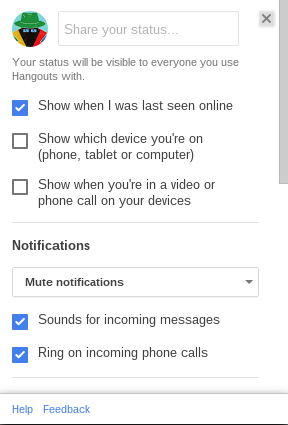
  • And you should see this popup:
    Screenshot 2015-02-28 at 12.06.51 AM.png
  • At the bottom of that, you should see “Feedback”
  • Click that.
  • Another popup will appear where you can write your feedback.


And that is how you report feedback to Google about the Hangouts app.


Summarize:
  • Open the app.
  • In the top right corner, you’ll see the gear icon. Click that.
  • A popup appears.
  • At the bottom of that, you should see “Feedback”
  • Click that.
  • Another popup will appear where you can write your feedback.

Resources:


For more information, check Google’s help center!
Talk to Hangout users just like you!


Thanks for reading!


If you enjoyed reading this blog post, please share it on social media sites such as Facebook, Twitter, Google +, etc. That’ll help me out a lot!


See an improvement? Tell me in the comment section!


Is there something you want me to blog about? Post that in the comment section as well!


Best of Luck,


▬▬▬▬▬▬▬▬

W.C. Blitzy

Tuesday, January 20, 2015

#37 Google Play - How to Redeem Gift Card Code

Hi ya!
This is a change of pace!
First blog post on Google Play subject.
Hope ya like it!

Let’s get started.

If you’ve recently purchased a Google Play gift card and wanna redeem it, here’s how to do so.

How to redeem Google Play gift card code on mobile

  • Open the Google Play Store app (looks like this: )
  • Tap the menu icon (looks like this: )
  • Find redeem
  • Enter your code

How to redeem Google Play gift card code on your computer


Now, if you wanna redeem your code when you are making a purchase, see the below.

  • In the course of the checkout process on your computer or mobile device, click/tap on the payment option dropbox
  • Select Redeem
  • Enter the code
  • Follow the instructions displayed across the screen

And, yeah. That is how you redeem your Google Play gift card code.

To Summarize:
  • How to redeem the code on mobile: Open the Google Play Store app
  • Tap the menu icon
  • Find redeem
  • Enter your code


  • How to redeem while in the process of making a purchase: In the course of the checkout process on your computer or mobile device, click/tap on the payment option dropbox
  • Select redeem
  • Enter the code
  • Follow the instructions displayed across the screen

References:


For more information, check Google’s help center!
Talk to Google Play users just like you!

Thanks for reading!

If you enjoyed reading this blog post, please share it on social media sites such as Facebook, Twitter, Google +, etc. That’ll help me out a lot!

See an improvement? Tell me in the comment section!

Is there something you want me to blog about? Post that in the comment section as well!

Best of Luck,

▬▬▬▬▬▬▬▬

W.C. Blitzy

Saturday, December 20, 2014

#26 - About Mobile

Hi ya!


I don’t discuss mobile topics.
You probably already know that by now.
You also might be asking why I don’t talk about mobile.
I don’t examine mobile topics because I don’t have a mobile device! So there’s no way for me to test things on mobile!

In the future, I may get a mobile device, and if I do, I will be sure to talk about mobile!


Just thought I should share that with you.


Thanks for reading!


If you enjoyed reading this blog post, please share it on social media sites such as Facebook, Twitter, Google +, etc. That’ll help me out a lot!


See an improvement? Tell me in the comment section!


Is there something you want me to blog about? Post that in the comment section as well!


Best of Luck,


▬▬▬▬▬▬▬▬
W.C. Blitzy.